Radius von einer ellipse bestimmen

M3lem

Mitglied
Hallo
ich möchte den Radius zwei Ellipsen berechnen, um herauszufinden, ob sie miteinander kollidiert sind.
ich kann den Abstand mittels dist Methode herausfinden, allerdings weiß es nicht, wie man den Radius berechnen kann.

Hier ist der Code:
Java:
import processing.core.PGraphics;

import java.util.Random;

class Ball {
    int x, y;
    int fillColor;
    float xSpeed = 5;
    float ySpeed = 6;
    int widthBound, heightBound;

    Random random = new Random();
    Ball(int fillColor, int widthBound, int heightBound) {
        this.fillColor = fillColor;
        this.widthBound  = widthBound;
        this.heightBound = heightBound;
        this.randomPos();
    }


    void randomPos() {
        this.x = random.nextInt(20, 581);
        this.y = random.nextInt(20, 581);
    }
    void draw(PGraphics g) {
        g.fill(this.fillColor);
        g.ellipse(this.x, this.y, 40, 40);
        x += xSpeed;
        y += ySpeed;


        if (x < 20 || x > widthBound-20) {
            xSpeed *= -1;

        }

        if (y < 20  || y > heightBound-20) {
            ySpeed *= -1;

        }
    }
}

_________________________________________________
Code:
import processing.core.PApplet;
public class Billiardtisch extends PApplet {
    public static void main(String[] args) {
        PApplet.runSketch(new String[]{""}, new Billiardtisch());
    }
    Ball b1, b2;
    Ball[] balls = new Ball[10];
    public void settings() {
        super.size(600, 600);
    }
    public void setup() {
        float d = dist(b1.x,b1.y,b2.x,b2.y);

         b1 = new Ball(color(234,56,21),width,height);
         b2 = new Ball(color(2,55,221),width,height);
        frameRate(20);
        super.background(0);
        for(int i = 0; i < balls.length; i++) {
            balls[i] = new Ball((color((int) (Math.random()*(255)),(int) (Math.random()*(255)),(int) (Math.random()*(255)))),super.width,super.height);
        }
    }
    public void draw() {
        super.background(0,102,51);
        b1.draw(super.g);
        b2.draw(super.g);
        //for (Ball elem : balls) elem.draw(super.g);
    }
}
 
Ich weiß es nicht, wie ich das korrigiere, deshalb poste ich es hier:

Java:
import processing.core.PApplet;
public class Billiardtisch extends PApplet {
    public static void main(String[] args) {
        PApplet.runSketch(new String[]{""}, new Billiardtisch());
    }
    Ball b1, b2;
    Ball[] balls = new Ball[10];
    public void settings() {
        super.size(600, 600);
    }
    public void setup() {
        float d = dist(b1.x,b1.y,b2.x,b2.y);

         b1 = new Ball(color(234,56,21),width,height);
         b2 = new Ball(color(2,55,221),width,height);
        frameRate(20);
        super.background(0);
        for(int i = 0; i < balls.length; i++) {
            balls[i] = new Ball((color((int) (Math.random()*(255)),(int) (Math.random()*(255)),(int) (Math.random()*(255)))),super.width,super.height);
        }
    }
    public void draw() {
        super.background(0,102,51);
        b1.draw(super.g);
        b2.draw(super.g);
        //for (Ball elem : balls) elem.draw(super.g);
    }
}
 
Willst du wirklich testen ob zwei ELLIPSEN miteinander kollidieren? (Spoiler: Das ist gar nicht so einfach...) oder geht es dir eigentlich um Kugeln bzw. Kreise?
 
Willst du wirklich testen ob zwei ELLIPSEN miteinander kollidieren? (Spoiler: Das ist gar nicht so einfach...) oder geht es dir eigentlich um Kugeln bzw. Kreise?
Er meint schon Kreise.
Ein Billiardtisch mit elliptischen "Kugeln" wär aber mal sowohl spielerisch als auch programmtechnisch eine echte Herausforderung.


@OP Deine Shapes sollten nur der Darstellung dienen.
Das Datenmodell (für Berechnungen) sollte getrennt davon sein.
Du hast eine Menge von Kugeln, jede hat einen Mittelpunkt und einen Radius. Beim Zeichnen bildest du diese Kugeln als Ellipsen ab.
Damit erübrigt sich das Ermitteln des Radius, da er für jede Kugel gegeben ist.
 
Hallo
ich möchte den Radius zwei Ellipsen berechnen, um herauszufinden, ob sie miteinander kollidiert sind.
ich kann den Abstand mittels dist Methode herausfinden, allerdings weiß es nicht, wie man den Radius berechnen kann.
Du meinst wohl Kreis da Du von einem Radius sprichst.
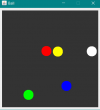
Hier ein Beispiel von 5 Kugeln die sich reibungsfrei innerhalb von Grenzen bewegen.
1666745229455.png
Java:
import javax.swing.JFrame;

public class TestBall {
    public static void main(String[] args) {
        JFrame frame = new JFrame("Ball");
        frame.setDefaultCloseOperation(JFrame.EXIT_ON_CLOSE);
        BallGame game = new BallGame(400, 400);
        frame.add(game);
        frame.pack();
        frame.setResizable(false);
        frame.setVisible(true);
        game.start();
    }
}
Java:
import java.awt.Color;
import java.awt.Dimension;
import java.awt.Graphics;
import java.awt.Rectangle;
import java.util.Random;

import javax.swing.JPanel;

@SuppressWarnings("serial")
public class BallGame extends JPanel implements Runnable {
    private Random rnd = new Random(System.currentTimeMillis());
    private Thread animator;
    private boolean running = false;
    private Rectangle bounds;
    private Ball[] balls;

    public BallGame(int width, int height) {
        setPreferredSize(new Dimension(width, height));
        init(width, height);
    }

    public void init(int width, int height) {
        int[][] start = { { width / 4, height / 4 }, { 3 * width / 4, height / 4 }, { 3 * width / 4, 3 * height / 4 },
                { width / 4, 3 * height / 4 }, { width / 2, height / 2 } };
        Color[] colors = { Color.WHITE, Color.RED, Color.BLUE, Color.YELLOW, Color.GREEN };
        int off = 10;
        bounds = new Rectangle(off, off, width - 2 * off, height - 2 * off);
        balls = new Ball[colors.length];
        for (int i = 0; i < colors.length; i++) {
            balls[i] = new Ball(40);
            balls[i].setAngle(rnd.nextInt(259));
            balls[i].setSpeed(2.2f);
            balls[i].setColor(colors[i]);
            balls[i].setPos(start[i][0], start[i][1]);
        }
    }

    @Override
    public void paintComponent(Graphics g) {
        g.fillRect(bounds.x, bounds.y, bounds.width, bounds.height);
        for (Ball b : balls)
            b.draw(g);
    }

    @Override
    public void run() {// very simple game loop
        while (running) {
            update();
            repaint();
            try {
                Thread.sleep(7);
            } catch (InterruptedException e) {
                e.printStackTrace();
            }
        }
    }

    public void start() {
        stop();
        animator = new Thread(this);
        running = true;
        animator.start();
    }

    private void stop() {
        running = false;
        while (animator != null && animator.isAlive())
            ;
        animator = null;
    }

    public void update() {
        for (int i = 0; i < balls.length; i++) {
            balls[i].move(bounds);
            for (int ii = i + 1; ii < balls.length; ii++) {
                if (balls[i].isCollision(balls[ii])) {
                    balls[i].bounce(balls[ii]);
                }
            }
        }
    }
}
Java:
public class Ball extends Sprite {

    public Ball(int size) {
        super(size, size);
    }

    public boolean bounce(Ball b) {
        if (!b.isCollision(this))
            return false;
        float distance = (float) pos.distance(b.pos);
        // pull back balls overlapping
        float L = getRadius() + b.getRadius() - distance;

        Vector x_d = b.pos.sub(pos);
        Vector c = x_d.scale(L / (2 * distance));
        pos = pos.sub(c);
        b.pos = b.pos.add(c);
        Vector v_d = dir.sub(b.dir);
        Vector w = x_d.scale((1 / (distance * distance) * x_d.dotProduct(v_d)));
        dir = dir.sub(w);
        b.dir = b.dir.add(w);
        return true;
    }

    public float getRadius() {
        return width / 2;
    }

    public boolean isCollision(Ball b) {
        if (!super.isCollision(b))
            return false;
        float aRadius = getRadius();
        float bRadius = b.getRadius();
        float xx = (pos.x + aRadius) - (b.pos.x + bRadius);
        float yy = (pos.y + aRadius) - (b.pos.y + bRadius);
        return Math.sqrt(xx * xx + yy * yy) < (aRadius + bRadius);
    }

    @Override
    public void draw(Graphics g) {
        g.setColor(color);
        g.fillOval(getX(), getY(), width, height);
    }

}
Java:
import java.awt.Color;
import java.awt.Graphics;
import java.awt.Rectangle;

public class Sprite {
    protected Vector pos = new Vector(0, 0);
    protected Vector dir = new Vector(0, 0);
    protected int width;
    protected int height;
    protected Color color = Color.WHITE;
    protected Rectangle boundingBox;

    public Sprite(int width, int height) {
        this.width = width;
        this.height = height;
        boundingBox = new Rectangle(width, height);
    }

    public void draw(Graphics g) {
        g.setColor(color);
        g.fillRect(getX(), getY(), width, height);
    }

    public double getAngle() {
        double angle = 0;
        if (dir.x != 0)
            angle = Math.toDegrees(Math.acos(dir.x / getSpeed()));
        else
            angle = Math.toDegrees(Math.asin(dir.y / getSpeed()));
        angle = Math.round(angle);
        return (dir.y < 0) ? 360 - angle : angle;
    }

    public Rectangle getBoundingBox() {
        boundingBox.x = getX();
        boundingBox.y = getY();
        return boundingBox;
    }

    public float getSpeed() {
        return (float) Math.sqrt(dir.x * dir.x + dir.y * dir.y);
    }

    public int getX() {
        return (int) pos.x;
    }

    public int getY() {
        return (int) pos.y;
    }

    public void invertX() {
        dir.x = -dir.x;
    }

    public void invertY() {
        dir.y = -dir.y;
    }

    public boolean isCollision(Sprite s) {
        return s.getBoundingBox().intersects(getBoundingBox());
    }

    public void move(Rectangle bounds) {
        pos.x += dir.x;
        pos.y += dir.y;
        if (bounds == null)
            return;
        moveInsideBounds(bounds);
    }

    private void moveInsideBounds(Rectangle bounds) {
        if (pos.x > bounds.x + bounds.width - width) {
            pos.x = bounds.x + bounds.width - width;
            invertX();
        } else if (pos.x < bounds.x) {
            pos.x = bounds.x;
            invertX();
        }
        if (pos.y > bounds.y + bounds.height - height) {
            pos.y = bounds.y + bounds.height - height;
            invertY();
        } else if (pos.y < bounds.y) {
            pos.y = bounds.y;
            invertY();
        }
    }

    public void setAngle(float angle) {
        angle = (float) Math.toRadians(angle);
        dir.x = (float) (Math.cos(angle));
        dir.y = (float) (Math.sin(angle));
    }

    public void setColor(Color color) {
        this.color = color;
    }

    public void setPos(int x, int y) {
        pos.x = x;
        pos.y = y;
    }

    public void setSpeed(float speed) {
        float scale = (1 / getSpeed()) * speed;
        dir.x *= scale;
        dir.y *= scale;
    }

    @Override
    public String toString() {
        return String.format("[%.2f:%.2f] > %.2f %d°", pos.x, pos.y, getSpeed(), (int) getAngle());
    }

}
Java:
import java.awt.geom.Point2D;

@SuppressWarnings("serial")
public class Vector extends Point2D.Float {

    public Vector(float x, float y) {
        this.x = x;
        this.y = y;
    }

    public Vector add(final Vector v) {
        return new Vector(x + v.x, y + v.y);
    }

    public float dotProduct(Vector v) {
        return x * v.x + y * v.y;
    }

    public Vector scale(float scalar) {
        return new Vector(x * scalar, y * scalar);
    }

    public Vector sub(final Vector v) {
        return new Vector(x - v.x, y - v.y);
    }

    public float size() {
        return (float) (Math.sqrt(x * x + y * y));
    }

}
 

Anhänge

Zuletzt bearbeitet:

Zurück
Oben