Hallo.
Ich habe 2 Benutzeroberflächen, eine für den Input und eine für den Output.
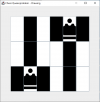
Allerdings besteht das Problem, dass wenn ich die Input GUI öffne und die Parameter eingebe nur beim ersten Mal die Output GUI ok ist (Schachbrett mit Größe nxn)
Wenn ich dann beim Input nochmals den Startbutton drücke, bekomme ich beim Output ein Schachbrett der Größe nx(2n), wobei die Befüllung dann auch komisch ist. Ich erstelle aber eigentlich jedes mal eine neue Output GUI und schließe die alte automatisch. Evtl hab ich wo einen Denkfehler oder jemand eine Idee?
Input:
Output:
Ich habe 2 Benutzeroberflächen, eine für den Input und eine für den Output.
Allerdings besteht das Problem, dass wenn ich die Input GUI öffne und die Parameter eingebe nur beim ersten Mal die Output GUI ok ist (Schachbrett mit Größe nxn)
Wenn ich dann beim Input nochmals den Startbutton drücke, bekomme ich beim Output ein Schachbrett der Größe nx(2n), wobei die Befüllung dann auch komisch ist. Ich erstelle aber eigentlich jedes mal eine neue Output GUI und schließe die alte automatisch. Evtl hab ich wo einen Denkfehler oder jemand eine Idee?
Input:
| public class Input_GUI implements ActionListener { //Parameter for main private static JFrame frame; private static JButton start; private static JLabel hint; private static JTextField input; private static ImageIcon img; private static JLabel outputChesssize; private static JLabel outputSolvedModels; private static JLabel outputTime; private static JLabel outputSolution; private static int closeOldWindow; // Mainclass public static void main(String[] args) { EventQueue.invokeLater(new Runnable() { @SuppressWarnings("static-access") //invalidate the warning public void run() { try { Input_GUI window = new Input_GUI(); window.frame.setVisible(true); } catch (Exception e) { e.printStackTrace(); } } }); } //Create Application for Input public Input_GUI() { frame = new JFrame(); frame.setTitle("Chess Queenproblem - Parameter"); frame.setBounds(100, 100, 430, 350); frame.setDefaultCloseOperation(JFrame.EXIT_ON_CLOSE); frame.getContentPane().setLayout(null); input = new JTextField(""); input.setBounds(261, 13, 39, 26); input.setHorizontalAlignment(JTextField.CENTER); input.setColumns(10); frame.getContentPane().add(input); start = new JButton("Optimize"); start.setBounds(298, 12, 112, 28); start.setFont(start.getFont().deriveFont(12f)); frame.getContentPane().add(start); hint= new JLabel("Enter the size of the chess field (Integer>0):"); hint.setBounds(10, 13, 400, 26); hint.setFont(hint.getFont().deriveFont(12f)); frame.getContentPane().add(hint); JLabel chessImage= new JLabel(); chessImage.setBounds(70, 60, w, h); chessImage.setHorizontalAlignment(JLabel.CENTER); chessImage.setFont(chessImage.getFont().deriveFont(12f)); chessImage.setIcon(img); frame.getContentPane().add(chessImage); closeOldWindow = 0; start.addActionListener(this); } // Eventhandler for Application public void actionPerformed(ActionEvent e) { if(e.getSource() == start) { if(closeOldWindow>0) {Output_GUI.closeOutputGUI();} String str = input.getText(); boolean isNumeric = true; for (int i = 0; i < str.length(); i++) { if (!Character.isDigit(str.charAt(i))) {isNumeric = false;} } if(isNumeric == true) { int n = Integer.valueOf(str); if(n>0) { try {Chess_queenproblem.startViaGUI(n);} catch (GRBException e1) {e1.printStackTrace();} hint.setForeground(Color.black); } else {hint.setForeground(Color.red);} } else {hint.setForeground(Color.red);} } closeOldWindow++; } } |
Output:
import java.awt.BorderLayout; import java.awt.Color; import java.awt.Dimension; import java.awt.GridLayout; import java.awt.Image; import javax.swing.*; /** * Object: Operation Research * Project: Chess * Programmer: Buchegger T, Pachteu S, Roth U, * Copyright 2022 Buchegger-Pachteu-Roth */ public class Output_GUI { // Parameter for main public static JFrame frame; private static JPanel panel1 = new JPanel(); private static JPanel panel2 = new JPanel(); private static JPanel panel3 = new JPanel(); private static JPanel panel4 = new JPanel(); private static JPanel panel5 = new JPanel(); private static int n; private static boolean[][] b; private static JButton[][] buttons; private static Dimension d; private static GridLayout layout; private static int i; private static int j; private static ImageIcon imgW; private static ImageIcon imgB; //Mainclass public static void main(String[] args, int nn, boolean[][] bb) { n = nn; b = bb; @SuppressWarnings("unused") //invalidate the warning Output_GUI s1 = new Output_GUI(n, b); } //Create Application for Output public Output_GUI(int n, boolean[][] b) { buttons = new JButton[n][n]; d = new Dimension(50, 50); layout = new GridLayout(n,n); i = 0; j = 0; frame = new JFrame("Chess Queenproblem - Drawing"); frame.setSize(500, 500); frame.setDefaultCloseOperation(JFrame.EXIT_ON_CLOSE); frame.setLayout(new BorderLayout()); panel1.setLayout(layout); panel2.setPreferredSize(d); panel3.setPreferredSize(d); panel4.setPreferredSize(d); panel5.setPreferredSize(d); imgW = new ImageIcon("C:images/chess_W.png"); imgB = new ImageIcon("C:images/chess_B.png"); // Create Fields for (i=0; i<n; i++) { for (j=0; j<n; j++) { buttons[j] = new JButton(""); buttons[j].setActionCommand("" + i); buttons[j].setActionCommand("" + j); if ((j % 2 == 0 || !(i % 2 == 0)) && ((i % 2 == 0 || !(j % 2 == 0)))) { if(b[j] == true) { buttons[j].setBackground(Color.white); int s = 300/n; imgW.setImage(imgW.getImage().getScaledInstance(s,s,Image.SCALE_SMOOTH)); buttons[j].setIcon(imgW); } else {buttons[j].setBackground(Color.white);} } else { if(b[j] == true) { buttons[j].setBackground(Color.black); int s = 300/n; imgB.setImage(imgB.getImage().getScaledInstance(s,s,Image.SCALE_SMOOTH)); buttons[j].setIcon(imgB); } else {buttons[j].setBackground(Color.black);} } panel1.add(buttons[j], BorderLayout.CENTER); } frame.add(panel1, BorderLayout.CENTER); frame.add(panel2, BorderLayout.WEST); frame.add(panel3, BorderLayout.EAST); frame.add(panel4, BorderLayout.SOUTH); frame.add(panel5, BorderLayout.NORTH); frame.setVisible(true); panel2.setLayout(new BoxLayout(panel2,BoxLayout.X_AXIS)); panel3.setLayout(new BorderLayout()); panel4.setLayout(new BorderLayout()); panel5.setLayout(new BorderLayout()); } } //Close old window public static void closeOutputGUI() { frame.dispose(); } } |