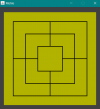
Mühle Spielfeld erstellen

Mastrix79

Mitglied
Hallo liebe Java Community!
Ich benötige für meinen Robotik Unterricht in der Schule eine Mühle Grafik in Netbeans. Das geht was ich weiß irgendwie mit Paint Funktionen oder so. Leider hab ich überhaupt wenig Ahnung von Programmierung und auch durch das Durchstöbern des Kapitels wirds auch nicht besser. Bitte kann mir jemand unbedingt helfen und eventuell das Spielfeld für das Spiel Mühle programmieren? Danke!
 
OK, dann wirst Du eine Komponente erstellen müssen. Dazu leitest Du z. B. von JPanel ab und überschreibst paintComponent. In paintComponent kannst Du mittels des übergebenen Graphics-Objekt zeichnen.
 
Ich benötige für meinen Robotik Unterricht in der Schule eine Mühle Grafik
1615396346292.png

[CODE lang="java" title="TestMill"]import javax.swing.JFrame;

public class TestMill {
public static void main(String[] args) {
JFrame frame = new JFrame("Mühle");
frame.setDefaultCloseOperation(JFrame.EXIT_ON_CLOSE);
frame.add(new MillPanel(500, 500));
frame.setResizable(false);
frame.pack();
frame.setVisible(true);
}
}
[/CODE]
[CODE lang="java" title="MillPanel"]import java.awt.BasicStroke;
import java.awt.Color;
import java.awt.Dimension;
import java.awt.Graphics;
import java.awt.Graphics2D;
import java.awt.Rectangle;
import java.awt.Stroke;
import javax.swing.JPanel;

@SuppressWarnings("serial")
public class MillPanel extends JPanel {
private Color boardColor = Color.YELLOW.darker();
private Color lineColor = Color.BLACK;
private Rectangle bounds;

public MillPanel(int width, int height) {
setPreferredSize(new Dimension(width, height));
int off = (int) (width * .05);
bounds = new Rectangle(off, off, width - 2 * off, height - 2 * off);
setBackground(Color.DARK_GRAY);
}

@Override
protected void paintComponent(Graphics g) {
super.paintComponent(g);
drawBoard(g);
}

private void drawBoard(Graphics g) {
Graphics2D g2D = (Graphics2D) g;
int width = bounds.width;
int height = bounds.height;
int stoneSize = getStoneSize();
Stroke oldStrok = g2D.getStroke();
g2D.setStroke(new BasicStroke(3));
g2D.setColor(boardColor);
g2D.fill(bounds);
int x = bounds.x + stoneSize;
int tmpWidth = width - 2 * stoneSize;
int step = tmpWidth / 3;
g2D.setColor(lineColor);
g2D.drawLine(bounds.x + width / 2, bounds.y + stoneSize, bounds.x + width / 2, bounds.y + height - stoneSize);
g2D.drawLine(x, bounds.y + height / 2, bounds.x + height - stoneSize, bounds.y + height / 2);
for (int i = 0; i < 3; i++) {
if (i == 2) {
g2D.setColor(boardColor);
g2D.fillRect(x, x, tmpWidth, tmpWidth);
}
g2D.setColor(lineColor);
g2D.drawRect(x, x, tmpWidth, tmpWidth);
tmpWidth -= step;
x += step / 2;
}
g2D.setStroke(oldStrok);
}

private int getStoneSize() {
return (int) (bounds.width * .1);
}

}[/CODE]

 
Anhang anzeigen 15042

[CODE lang="java" title="TestMill"]import javax.swing.JFrame;

public class TestMill {
public static void main(String[] args) {
JFrame frame = new JFrame("Mühle");
frame.setDefaultCloseOperation(JFrame.EXIT_ON_CLOSE);
frame.add(new MillPanel(500, 500));
frame.setResizable(false);
frame.pack();
frame.setVisible(true);
}
}
[/CODE]
[CODE lang="java" title="MillPanel"]import java.awt.BasicStroke;
import java.awt.Color;
import java.awt.Dimension;
import java.awt.Graphics;
import java.awt.Graphics2D;
import java.awt.Rectangle;
import java.awt.Stroke;
import javax.swing.JPanel;

@SuppressWarnings("serial")
public class MillPanel extends JPanel {
private Color boardColor = Color.YELLOW.darker();
private Color lineColor = Color.BLACK;
private Rectangle bounds;

public MillPanel(int width, int height) {
setPreferredSize(new Dimension(width, height));
int off = (int) (width * .05);
bounds = new Rectangle(off, off, width - 2 * off, height - 2 * off);
setBackground(Color.DARK_GRAY);
}

@Override
protected void paintComponent(Graphics g) {
super.paintComponent(g);
drawBoard(g);
}

private void drawBoard(Graphics g) {
Graphics2D g2D = (Graphics2D) g;
int width = bounds.width;
int height = bounds.height;
int stoneSize = getStoneSize();
Stroke oldStrok = g2D.getStroke();
g2D.setStroke(new BasicStroke(3));
g2D.setColor(boardColor);
g2D.fill(bounds);
int x = bounds.x + stoneSize;
int tmpWidth = width - 2 * stoneSize;
int step = tmpWidth / 3;
g2D.setColor(lineColor);
g2D.drawLine(bounds.x + width / 2, bounds.y + stoneSize, bounds.x + width / 2, bounds.y + height - stoneSize);
g2D.drawLine(x, bounds.y + height / 2, bounds.x + height - stoneSize, bounds.y + height / 2);
for (int i = 0; i < 3; i++) {
if (i == 2) {
g2D.setColor(boardColor);
g2D.fillRect(x, x, tmpWidth, tmpWidth);
}
g2D.setColor(lineColor);
g2D.drawRect(x, x, tmpWidth, tmpWidth);
tmpWidth -= step;
x += step / 2;
}
g2D.setStroke(oldStrok);
}

private int getStoneSize() {
return (int) (bounds.width * .1);
}

}[/CODE]
Vielen lieben Dank🤟
 

Neue Themen


Zurück
Oben