Hallo zusammen
Anhang 1:
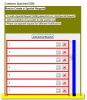
Im Composite 1 (blau - innerhalb Group und Composite(grün) und Composite mit Button (grau)) werden mit Hilfe des Buttons zusätzliche Composites eingefügt (rot).
Composite 1 (blau) sollte grundsätzlich scrollbar sein oder zumindest wenn zuviele zusätzliche Composites (rot) eingefügt werden.
Wie kann ich Composite 1 scrollbar machen. So wie ich es jetzt habe erscheinen keine Scrollbalken.
Herzlichen Dank für Tipps.
Code im blauen Composite:
Anhang 1:
Im Composite 1 (blau - innerhalb Group und Composite(grün) und Composite mit Button (grau)) werden mit Hilfe des Buttons zusätzliche Composites eingefügt (rot).
Composite 1 (blau) sollte grundsätzlich scrollbar sein oder zumindest wenn zuviele zusätzliche Composites (rot) eingefügt werden.
Wie kann ich Composite 1 scrollbar machen. So wie ich es jetzt habe erscheinen keine Scrollbalken.
Herzlichen Dank für Tipps.
Code im blauen Composite:
Java:
		this.setBackground(CodesColors.GREY_BACKGROUND_DEFAULT);
		this.setLayout(new GridLayout(1, false));

		GridData gridData = new GridData(SWT.FILL, SWT.FILL, true, true);
		gridData.widthHint = 400;
		this.setLayoutData(gridData);

		addButton = new Button(this, SWT.PUSH);
		addButton.setText(buttonTitle);
		addButton.setLayoutData(new GridData(SWT.CENTER, SWT.CENTER, true, true));

	    final ScrolledComposite scroller = new ScrolledComposite(this, SWT.H_SCROLL | SWT.V_SCROLL);
	    scroller.setBackground(CodesColors.BLUE);
	    compositeList = new Composite(scroller, SWT.NONE);
		compositeList.setLayout(new GridLayout(1, false));
	    compositeList.setLayoutData(new GridData(SWT.FILL, SWT.FILL, true, true));
	    compositeList.setBackground(CodesColors.RED);
	    scroller.setContent(compositeList);
	    compositeList.setSize(300, 200);
	}

	public void addLine(final T t, String title, boolean initial) {
		if (!initial) {
			ts.add(t);
		}
		final LineComponent<T> lineComponent = new LineComponent<T>(dirtyAdvisor, compositeList, title,
				type);

		SelectionListener deleteListener = new SelectionAdapter() {

			@Override
			public void widgetSelected(SelectionEvent e) {
				ts.remove(t);
				lineComponent.dispose();
				compositeList.pack();
			}

		};
		lineComponent.initialize();
		compositeList.pack();
		lineComponent.addDeleteListener(deleteListener);
		lineComponent.load(t);
	}