Running jar files, resulting in failure

Rakshan

Mitglied
Hi,
I have a testing application which runs perfectly on the eclipse IDE. It was developed by an excolleagiue, so there is not much documentation.
Now it is said, that the same application could be executed in command line as well.

So, I export the jar, point the Main class and export it to the same directory as the project.

Eg:
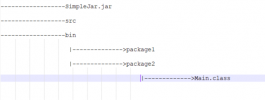
Project
------------------SimpleJar.jar
------------------src
------------------bin
|-------------->package1
|-------------->package2
|------------->Main.class


The structure is as shown above.
My Main.class is programmed to take arguments.

So now, from the command line, I go to the directory.. I say java-jar SimpleJar.jar info, I expect to give a 2-3 line intodcution.
However i get a response like

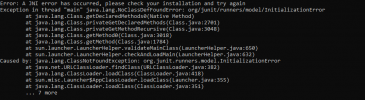
Error: Unable to initialize main class testclient.Main
Caused by: java.lang.NoClassDefFoundError: org/junit/runners/model/InitializationError

Anothe rthing I did is, i moved to the bin folder and directly did the java Main.class info. Yet same error.

Please let me know
 
First of all: this is a german speaking forum. So feel free to switch to german.

Regarding the execution of your jar file: There are dependencies missing. You have to get all dependencies and add them to the classpath (e.g. -cp switch)
 
Wenn es in der Eclipse IDE per Run Configuration funktioniert, dann brauchst du die Run Configuration nur als **Runnable** Jar zu exportieren.
Dort werden dann standardmässig alle im Eclipse Projekt referenzierten externen Abhängigkeiten ins JAR entpackt, so dass sie im Classpath/JAR sind.

Witzig ist auch, dass die Tatsache, dass die Anwendung von einem Exkollegen entwickelt wurde, impliziert, dass es keine Dokumentation gibt. Ist er deswegen ein *ex*-Kollege? 🙂
 
@kneitzel :Entschuldidung, mein Deutsch ist nicht so gut, ich kann nur ein bischen verstanden..
And regarding the dependencies, i have added them all while exporting the jar from eclipse.
My manifest file has the following contents:
-----------------------------
Manifest-Version: 1.0
Main-Class: testclient.Main

----------------------------

Is my command line instruction incorrect? I am using the below
--------------------
java -cp SimpleJar.jar;lib/*; /bin/testclient.Main

--------------------
@httpdigest hehe 😀 gerne!
BTW, i cannot export it as runnable jar as I there are many run configurations set up. I need to do it from command line by passing the parameters.
 
Then select _one_ of those run configurations (just the one that you would also use to run the application from within the IDE....)
If you cannot use the Eclipse IDE GUI to create a runnable jar and can only use the command line, then what you _actually_ want is to use a Java build system, like Maven, Gradle or (if you must) Ant, which you can then invoke from the command line to build a runnable jar containing all dependencies.
 
Is my command line instruction incorrect? I am using the below
--------------------
java -cp SimpleJar.jar;lib/*; /bin/testclient.Main
If you want to do it mnually like that (instead of creating a jar File that includes everything):

java -cp lib/* -jar SimpleJar.jar
might work if you have all dependend jar files inside lib

Or you could do:
java -cp SimpleJar.jar;lib/* testclient.Main
(Then the Manifest of the jar file is no longer used)
 
thank you @kneitzel . Still cannot get past this.

Currently in Eclipse( Run config: The run time jre is JAVASE-1.8
However, the JDK on my local machine is 16.0.

Could this be an issue?
 
If you still get the error:
Error: Unable to initialize main class testclient.Main
Caused by: java.lang.NoClassDefFoundError: org/junit/runners/model/InitializationError
then the problem is, that a class is missing.

So I would check what junit version the project was using and then add that jar file, too. That class seems to belomg to JUnit 4 so you could try to add the junit jar file from https://search.maven.org/artifact/junit/junit/4.13.2/jar to your lib directory. (Or just check where you have the junit.jar file on your system and take that!)
 
But that means, that the class org.junit.runners.model.InitialozationError could not be found. So you are sure that the jar file is on the classpath?

And what I just see:
You are working on Windows or Linux?
On Windows, the path should be given with a \, divider between entries of the classpath is ;
On Unix(Mac/Linux) path should be given with / and elements are divided by :

Maybe that is a problem.

Another solution might be, to add dependencies directly inside the jar.

So you could Edit the Manifest file inside the jar file and add something like:
Class-Path: lib/one.jar lib/two.jar
List of jar files inside lib folder. (So one.jar, two.jar in this example) Once you list all jar files in there, you can simply call
java -jar ......
without adding classpath. But the lib folder should be next to your jar file (which is the case if I understood you correctly).
 

Neue Themen


Zurück
Oben